Holidays & absence · From Starter

Holiday requests, approved in one place.

Staff request holiday from their phone, you check their allowance and who else is off, and approved leave shows on the same calendar as the rota. Sickness and other unplanned absence get their own, restricted record.

Holiday requests and absence records are on Starter, £19 a month for up to 10 employees.

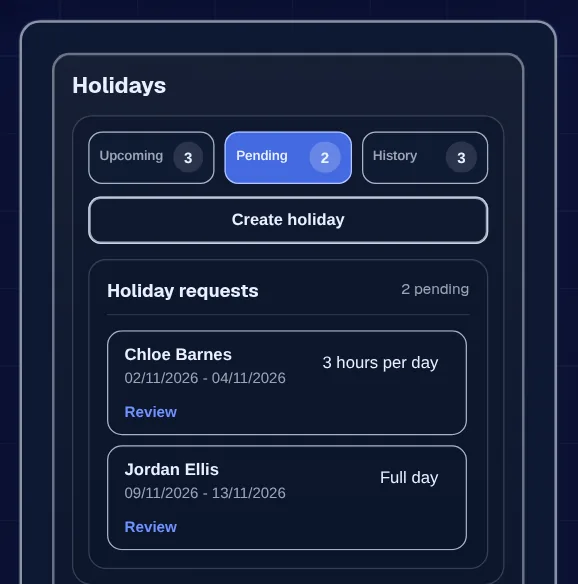
Holidays card on the Pending tab with two holiday requests waiting for review
Requests and allowance together

The problem

Two people booked the same week, and nobody noticed.

Holiday gets asked for in passing, in a text or on the group chat. Someone writes it on the wall chart, or means to. Then two of your three engineers are off in the same week in August and the job you promised a client is short-handed.

Working out what's left is worse. Part-timers and a mix of days and hours turn the spreadsheet into guesswork, and sickness ends up in the same column as holiday.

  • Requests lost in texts and chats
  • No quick view of who's already off
  • Allowances worked out by hand
  • Sickness mixed in with holiday

How it works in Employr

From request to the rota in four steps.

  1. Step 1

    Set the allowance once

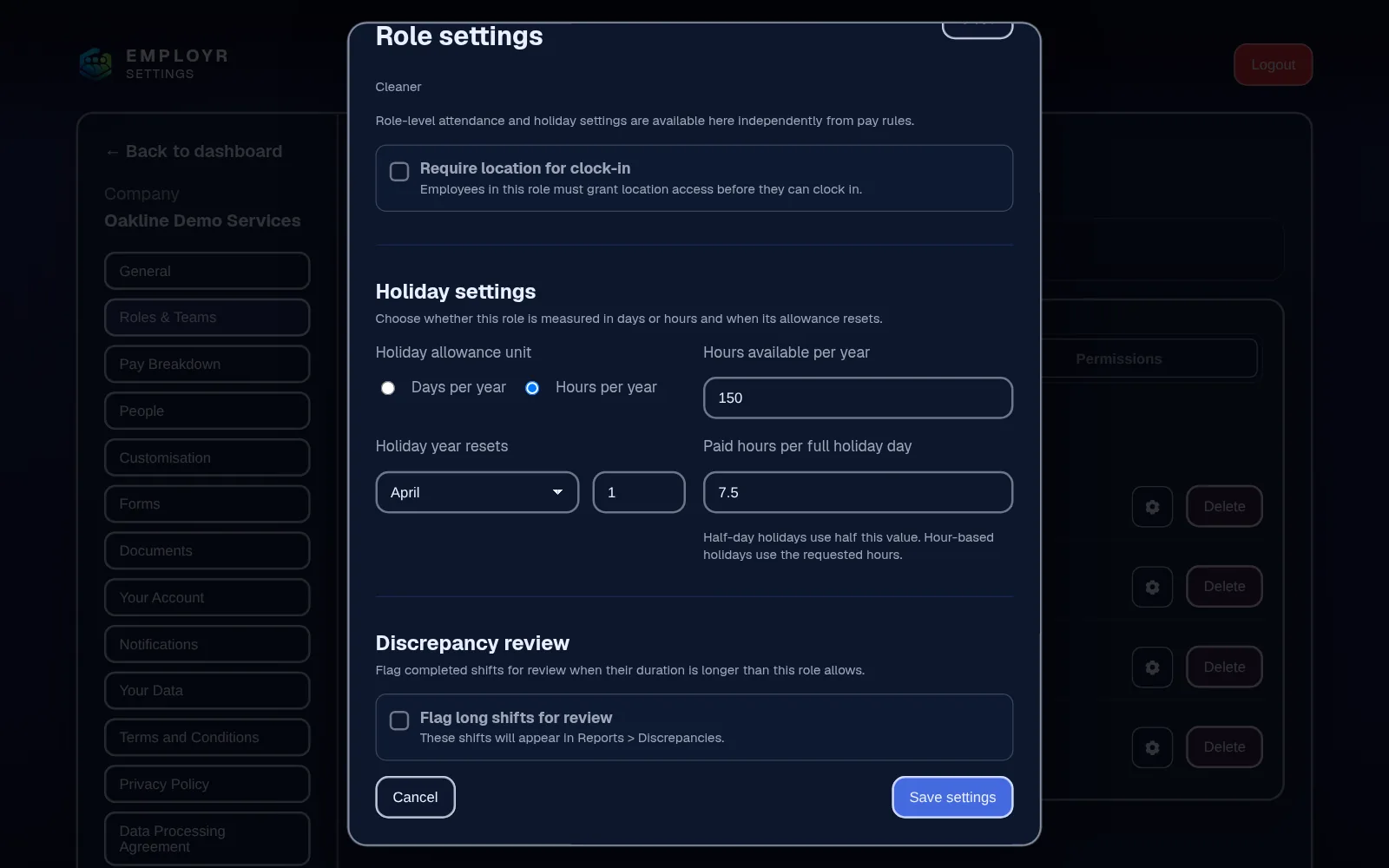
    For each role, choose whether holiday is counted in days or hours, set the yearly amount in whole numbers, the date the holiday year resets, and the hours that make up a full holiday day.

    Role settings with holiday allowance in hours, the holiday-year reset date and hours per holiday day
    Allowance by role
  2. Step 2

    Staff request it

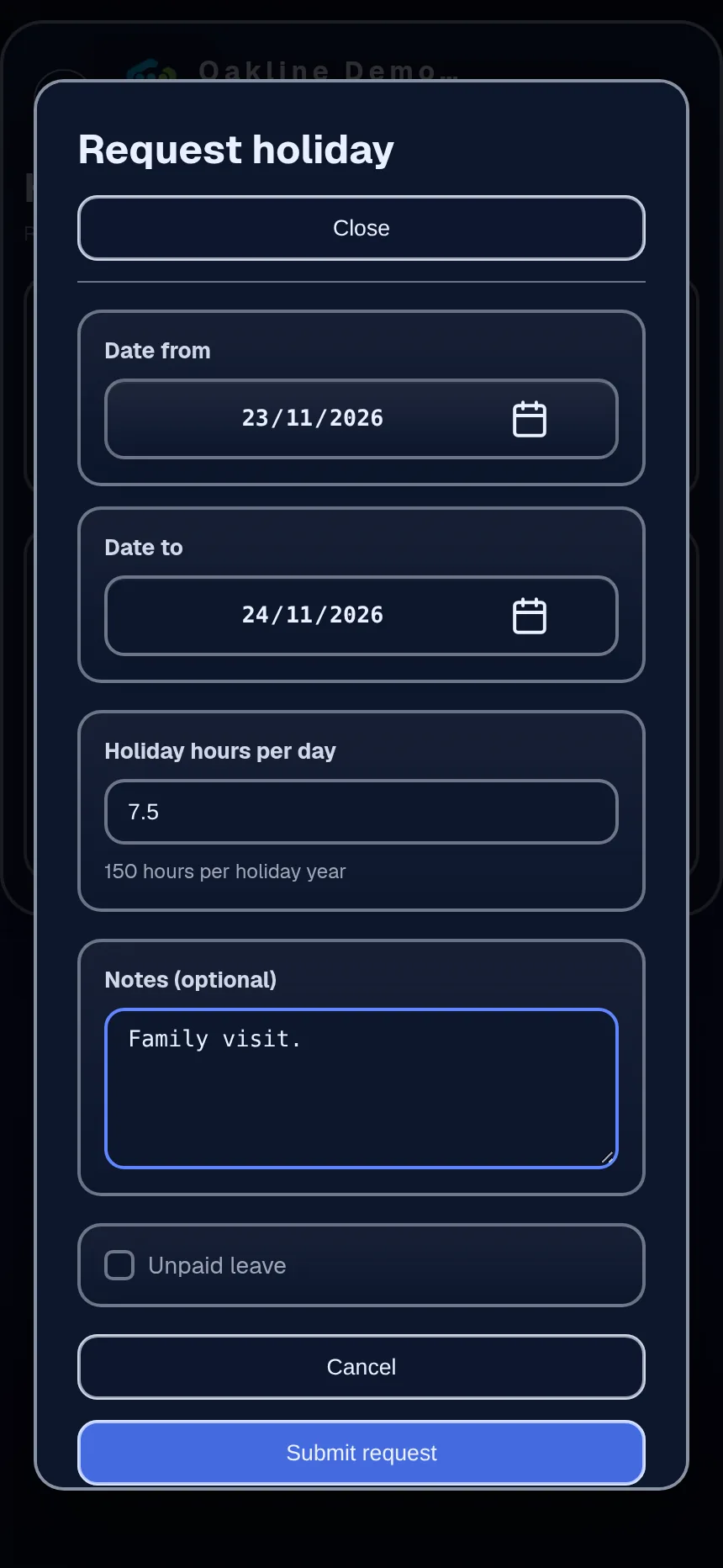
    The employee picks the dates and a full or half day, or the hours if their role counts holiday in hours, and adds a short note if it helps. They can see whether it's pending, approved or refused, and cancel it if plans change.

    Holiday request on a phone with the dates, holiday hours per day and a note
    A request on the phone
  3. Step 3

    Check, then decide

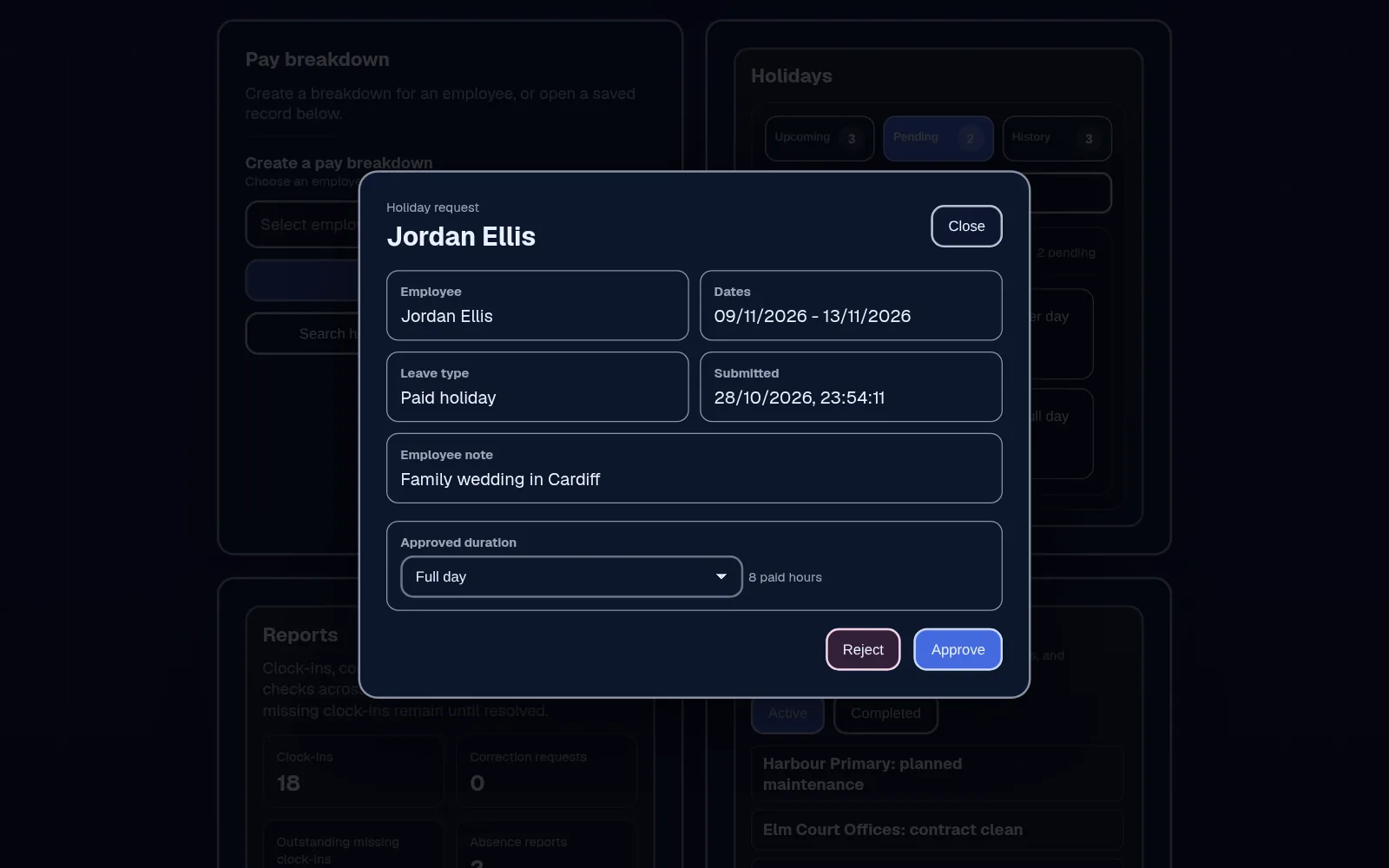
    Open the request from the approval queue, check the person's remaining allowance on their profile and who else is off on the calendar, then decide. If you refuse it, add a reason so they know why.

    Holiday request open for review with the employee, dates, leave type, notes, and Reject and Approve buttons
    Approval queue
  4. Step 4

    See it on the calendar

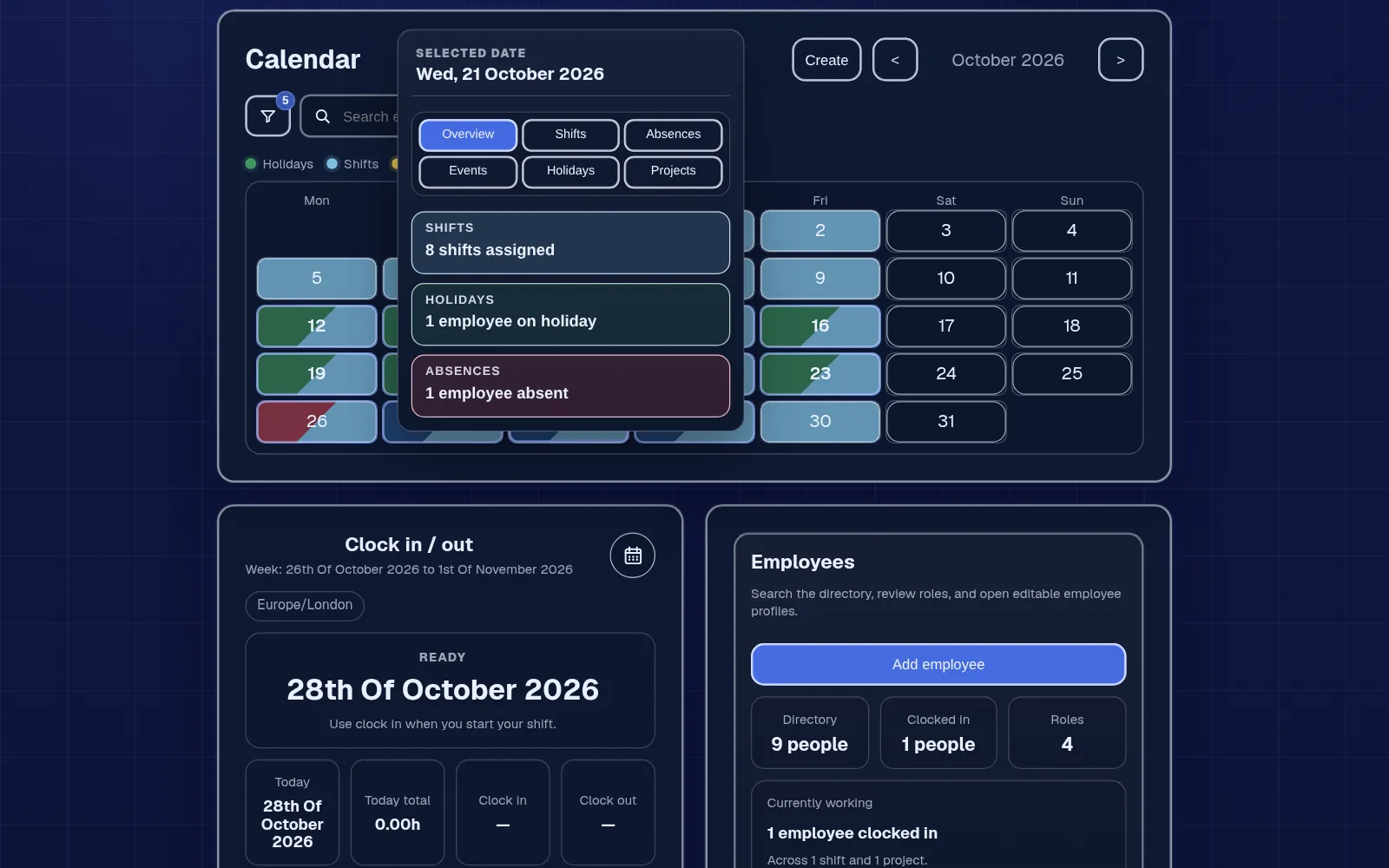
    Approved holiday appears on the shared calendar beside shifts and project work, and comes off the allowance. A pending request isn't shown as confirmed leave, so nobody plans around it by mistake.

    Shared calendar with one day open showing the shifts, who is on holiday and who is absent
    Leave beside the rota

In detail

Built for mixed teams, not just nine-to-five.

Days or hours, per role

Office staff might count holiday in days and part-time cleaners in hours. Each role has its own basis, amount and reset date, so one company can use both. Unused holiday doesn't carry over: the balance resets at the start of each role's holiday year. Elsewhere it may be called PTO or annual leave; it works the same way.

Absence kept separate

Unplanned absence, such as sickness, is recorded as an absence, not a holiday. It has its own dates, type or reason, notes and optional evidence, and it doesn't touch the holiday balance.

Sensitive detail stays restricted

Staff see only their own absence records. The reason and any evidence can only be opened by roles you allow to manage absence. Health details don't belong in a calendar label.

Reports when you need them

The Holidays card shows upcoming, pending and past requests, and Reports has a tab for absence reports, so you can review a period and see what's waiting for a decision.

What Employr doesn't do

You set a yearly allowance per role, Employr shows each person's remaining balance after approved holiday, and admins can adjust it. Your business sets the allowance: Employr doesn't calculate the statutory minimum for part-time or irregular-hours staff, accrue holiday, calculate holiday pay or sick pay, or run payroll. Check entitlements on GOV.UK and follow your own policy and employment law when you make decisions.

Keep exploring

Related features and industries.

Questions

Common questions.

Can staff request holiday on their phone?

Yes. Employr runs in the phone's browser, so staff request holiday from their own account and can see whether it's pending, approved or refused. Native Android and iOS apps are in development.

Can I count holiday in hours for part-time staff?

Yes. Each role can count holiday in days or hours, with its own yearly amount and reset date. Amounts are whole numbers, so for some part-time patterns it's easier to count in hours.

Does Employr work out holiday entitlement?

Yes, from the allowance you set. Each role gets a yearly allowance in days or hours, and Employr works out each person's remaining balance as holiday is approved. Admins can adjust it. It doesn't calculate the statutory minimum for part-time or irregular-hours staff, or holiday pay. GOV.UK explains statutory entitlement and has a holiday entitlement calculator.

Is sickness recorded as holiday?

No. Unplanned absence has its own record with dates, a reason, notes and optional evidence, and it doesn't come off the holiday allowance. Limit who can see absence evidence to the people who need it.

Can I see who's off before I plan the rota?

Yes. Approved holiday shows on the shared calendar beside shifts, and roles that manage absence see recorded absence there too, so you can spot gaps first.

Is this a PTO tracker?

Yes. PTO, annual leave and holiday mean the same here: time off taken from an allowance.

Which plan is it on?

Holiday requests and absences are on Starter and above. Starter is £19 a month for up to 10 employees. The Free plan covers the rota and clocking in for up to 5 employees, but not holiday.

Try it with your team

Swap the wall chart for one queue.

Start with the rota and clocking in, then add holiday requests and absence records when you need them.